Your Airbnb commission is about to jump from 3% to 15.5% because of Airbnb host fees. Your income does not have to move at all — if you do one calculation correctly, and it is not the calculation most hosts reach for first. It is not the one Airbnb’s own migration tool makes for you either, and that difference is worth about $3 on every $100.
Airbnb has been retiring its old split-fee model in waves since October 2025. The final wave — hosts who don’t use a channel manager or PMS — is now rolling, country by country. It is probable that all hosts will need to make the move, worldwide. Airbnb’s March 22, 2026 Resource Center post names the first batch (Peru and South Korea switched May 25; Germany and the UK on June 22), its Help Center describes the split fee as a structure that “will no longer be available to certain hosts,” and the company has built a dedicated price adjustment tool in the app to move the last hosts over. On July 7, 2026, Airbnb made it official for everyone: a new Resource Center announcement sets the final deadlines — September 15, 2026 for hosts outside the European Economic Area, October 13, 2026 for hosts inside the EEA and Switzerland.
Lee esta guía en español: La comisión de Airbnb del 15,5% para todos los anfitriones.
Companies do not build migration tooling for changes they don’t intend to finish.

The two numbers you will see quoted are not competing answers. They measure the same price move from different starting points, so what matters is which field you are typing into.
- If you set prices on Airbnb, or push them from a pricing tool: raise every price component by 15% (more if VAT applies and you are not VAT registered). On a $100 listing that is $115, and your payout stays at the $97 you were already receiving.
- If you use a PMS or channel manager: set your Airbnb channel markup to 18.34%, replacing the roughly 3% that was there before. Same payout. This is not an 18.34% price rise, and you switched in 2025 or early 2026 anyway.
Key facts:
- Old model: you pay 3%, your guest pays a 14.1–16.5% service fee on top of your price.
- New model: you pay a single host fee, 15.5% for most hosts (14%–16% depending on country, listing type, and cancellation policy; 16% in Brazil and Mexico). Your guest pays no service fee.
- Change nothing, and your payout drops about 12.9%: on a $100 price, from $97 to $84.50. Airbnb’s own example says the same: “if you keep your price at $100, you’ll earn $84.50.”
- Where you type the number matters as much as the number. Raising a listed price by 15% keeps your payout level (the exact figure is 14.79%). Setting a PMS channel markup to 18.34% does the same job, because a PMS markup starts from your target payout rather than your sticker price. Putting 18.34% on a listed price is a different move: it pays you about $3 more per $100 than you were getting.
- Airbnb’s price adjustment tool restores your old payout, not your full price. Accepting its adjustment is fine — just know what you accepted.
- Bookings already on your calendar keep the old fee, confirmed by Airbnb, even if those bookings are altered later.
- Using a pricing tool like PriceLabs does not exempt you. Airbnb counts direct connections to pricing software as “non-connected” — this wave includes you.
In a hurry? The 60-second version
- Find your exact host fee (most hosts: 15.5%). It shows in your listing’s service-fee details and on any post-switch reservation.
- Your target: every price component (nightly rates, cleaning fee, extra guest and pet fees) grossed up so that what lands in your account is unchanged. At a 15.5% fee that is your old $97 payout divided by 0.845, so × 1.1479 on your current price, which most hosts can round to 15%. If you also want to recover the 3% you used to pay, use × 1.1834 instead and know your guest funds it.
- Find your case in the table below — manual pricing, Smart Pricing, a pricing tool, or a PMS — and adjust in one place only.
- Book a fake test stay in an incognito window and check that the payout matches your target.
What is the Airbnb host-only fee?
The host-only fee (Airbnb also calls it the “single fee” or “simplified” fee) replaces the split fee Airbnb has used since its early days. Under the split fee, the host paid a 3% commission and the guest paid a service fee of roughly 14.1% to 16.5% at checkout. Under the host-only fee, Airbnb deducts one commission from the host’s payout, and the guest sees no Airbnb service fee line at all. Airbnb says the 15.5% “is based on Airbnb’s global average service fees” — in other words, the same money, collected in one place.
If this feels like new territory, it isn’t. The timeline so far:
- 2020–2021: most software-connected hosts outside the Americas moved to a ~15% host-only fee.
- October 27, 2025: US and Canadian hosts using property management software (PMS — the channel managers professional hosts connect to Airbnb) switched to 15.5%, as we covered at the time.
- April 13, 2026: the remaining PMS-connected hosts worldwide followed, per Airbnb’s April announcement.
- May 25, 2026: hosts in Peru and South Korea — the first no-software countries.
- June 22, 2026: hosts in Germany and the UK.
- Next: July 7, 2026: Airbnb announces the final wave for all remaining hosts: deadline September 15, 2026 outside the EEA, October 13, 2026 inside the EEA and Switzerland.
How do you know when it’s your turn? Airbnb notifies hosts by email and in the dashboard, and the price adjustment tool appears in your account ahead of your deadline. No notice yet means no change yet — but the tool showing up is the tell.
Booking.com has charged a host-only commission of about 15% forever, and European vacation rental managers have run profitable businesses on this model for years. The model works. What hurts hosts is not the model — it is failing to adjust prices when the switch happens.
One reassurance before the math, because it is the question hosts ask first on the Airbnb Community forums: reservations already confirmed keep the split fee. Airbnb’s Help Center is explicit: the new fee applies only to reservations made after your switch, and pricing for bookings made before “will not be affected by any reservation changes, even if those changes occur after the adjustment.” Your calendar is safe.
And one simplification to kill early: “everyone pays 15.5%” is not quite true. Airbnb’s Help Center says most hosts pay 15.5%, while “remaining hosts typically pay 14%–16%.” Brazil and Mexico are at 16%, Super Strict cancellation policies and some listing types pay more, some traditional hospitality listings less. Check your own number before touching a single price. The formula below works for any rate.
How much should you raise your Airbnb prices? The wrong math vs the right math
Here’s the thing: Airbnb calculates its fee on your final listed price — the price after you raise it. This one detail is what trips everyone up, including, at first, us — we published a correction on this exact point during the October 2025 wave.
Say your fee is 15.5% and your current price is $100 a night. Under the old model, your guest paid about $114.50 all-in (we use 14.5% as an illustrative mid-range guest fee) and you received $97. Now compare what each adjustment method does:
| Method | Guest now pays | Your payout | Verdict |
|---|---|---|---|
| Do nothing | $100.00 | $84.50 | A 12.9% pay cut |
| Add the 12.5-point difference | $112.50 | $95.06 | Still short. The fee comes out of the raised price, not off the old one |
| Add 15% (recommended) | $115.00 | $97.18 | Stay level. Your payout is unchanged, with 18 cents of buffer |
| Multiply by 1.1479 (+14.79%) | $114.79 | $97.00 | Stay level, to the cent. This is what Airbnb’s tool targets |
Both of the failing versions make the same mistake: they add the fee on top, when the fee comes out of the total. To receive $X after a fee, you must list X ÷ (1 − fee). Divide, don’t multiply. The 15% recommendation is that division, rounded for convenience.
Which one should you pick? Start from what you were actually receiving. Under the split fee you listed $100 and Airbnb paid you $97. The $100 was the sticker. The $97 was the money.
Airbnb’s guidance and its price adjustment tool both aim at that $97: “adjust your prices to keep your payouts per night the same,” with the guest seeing the same total as before. So does PriceLabs’ own migration guidance. This is the default we would use. The fee change costs you nothing, your guest notices nothing, and your conversion does not move.
Going to 18.34% is a different decision. It pays you $100, roughly $3 more than that listing has ever earned you, funded by a guest paying about $4 more than before. That is a price increase using the fee change as its occasion. Plenty of hosts will want it, and after years of treating the sticker as theirs it is easy to justify. Our read: reasonable, but judge it as a repricing decision on its own merits, because that is what it is. It is not fee compensation.
If your fee is not 15.5%, same logic, different number:
| Your host-only fee | Stay level (on a listed price) | Take back the 3% |
|---|---|---|
| 14% | +12.79% | +16.28% |
| 15% | +14.12% | +17.65% |
| 15.5% (most hosts) | +14.79% | +18.34% |
| 16% (Brazil, Mexico) | +15.48% | +19.05% |
Round up a little if you prefer clean numbers. At 15.5%, that is the 15% we recommend above.
PMS and channel manager users: your channel markup is a different calculation, because it starts from your base rate rather than your listed price. At a 15.5% fee, set it to 18.34%, replacing the roughly 3% that was there before. That lands you in the same place as the stay-level column.
The fee applies to your whole subtotal — nightly rate, cleaning fee, extra guest and pet fees — but not to the taxes Airbnb collects. So the markup must go on every price component, not just the nightly rate. A host who raises nightly rates and forgets the $150 cleaning fee is donating $23 of it to Airbnb on every booking.
VAT, for UK and EU hosts. In countries where Airbnb charges VAT on its service fee, your effective rate is higher than 15.5%, so your increase has to be bigger than 15%. In the UK, 15.5% plus 20% VAT is an effective 18.6%, and staying level takes an increase of about 18.4%.
Those two numbers look nearly identical and mean opposite things. 18.6% is what Airbnb keeps. 18.4% is what you add. Do not read one for the other.
| Country | Increase to stay level |
|---|---|
| UK, France | 18.4% |
| Germany | 18.2% |
| Spain | 18.6% |
| Italy | 18.8% |
| Ireland, Portugal | 19.0% |
If you are VAT registered, use the standard 15% instead. You recover the VAT through your return, so adjusting for it a second time in your prices would overcharge your guests. This is the opposite of what most hosts assume, and it is where UK hosts and Airbnb’s own support agents went in circles for weeks on the community forums.
Airbnb’s Q&A settles who gets automated help: “Your price adjustment includes these taxes unless you’re VAT/GST registered and required to account for them yourself.” So non-registered hosts get VAT baked into the tool’s ratio; registered hosts handle their own adjustment. Talk to your accountant if you are registered.
We break down the full VAT math, country by country, in our guide to VAT on Airbnb’s host fee.
Which host are you? Find your case
This is where most guides go vague, so let’s be precise. Four situations, four different moves. The golden rule across all four: adjust in one place only. Two adjustments stack, and a double-marked-up listing is 30–40% overpriced.
| How you set prices today | Your case | Your one move |
|---|---|---|
| By hand, in the Airbnb calendar | Case 1 | Use Airbnb’s price adjustment tool, then verify |
| Airbnb’s Smart Pricing | Case 2 | Check your minimum price and manual overrides |
| A pricing tool connected straight to Airbnb (PriceLabs, Beyond, Wheelhouse…) | Case 3 | Adjust in the tool — do NOT let Airbnb’s tool touch prices |
| A PMS or channel manager (Guesty, Hostaway, Lodgify, Smoobu…) | Case 4 | You switched in 2025–26; check your markup covers fees |
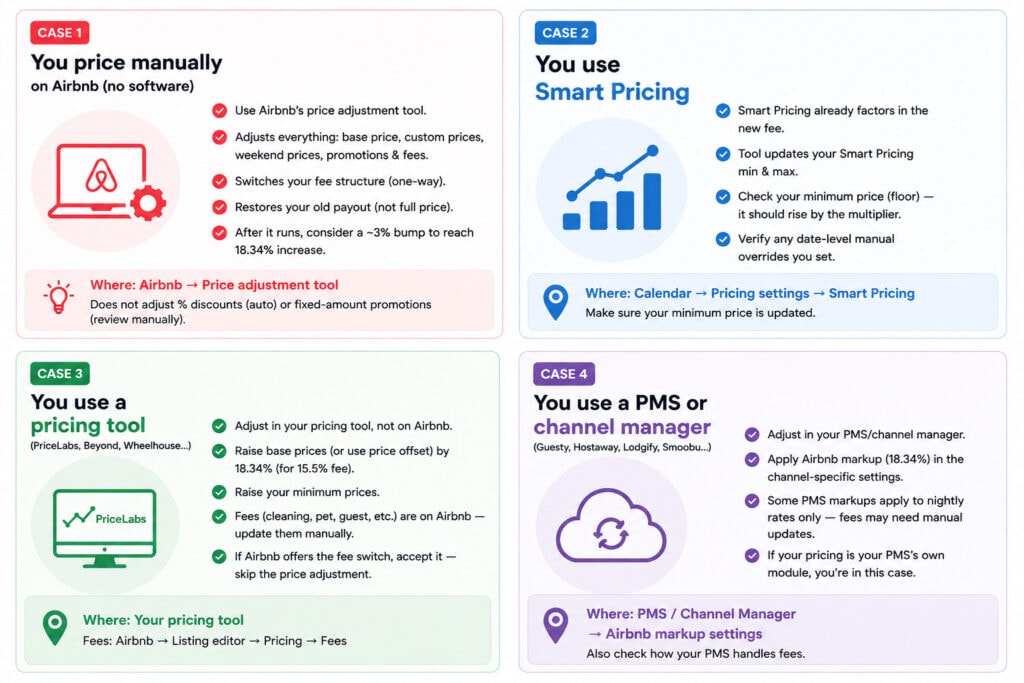
Case 1: You price manually on Airbnb (no software)
You are exactly who Airbnb built the price adjustment tool for. It appears in your account ahead of your deadline and makes a one-time adjustment of everything: base price, custom prices, weekend prices, custom promotion prices, and additional fees (cleaning, pet, extra guest), across all your listings — active and inactive — for the next two years of calendar. Using it also switches your fee structure, and that part is a one-way door: no return to the split fee.
Our advice: use it. It saves you hours of hand-editing custom prices, and it bakes VAT into the ratio if you’re not VAT-registered. But go in knowing three things hosts in the UK wave learned the hard way.
First, the tool raises your cleaning and other fees too — on purpose, “to make sure you’re not worse off,” as one host had to explain to another after Airbnb support wrongly denied it.
Second, it adjusts calendar dates before your switch date as well; that confused hosts, but remember pre-switch bookings keep the old fee, so no money is lost.
Third, know exactly what the tool targets: it puts your payout back where it was and stops there. For most hosts that is the right outcome and you can leave it alone. If you have decided you also want the 3% you used to pay, nudge everything up about 3 more points afterwards. Worth $3 per $100, and your guest is the one paying it.
What the tool does not handle: percentage discounts (fine — they scale automatically) and fixed-amount promotions, which need a manual review.
Case 2: You use Airbnb’s Smart Pricing
Good news: according to Airbnb, once you are on the single-fee structure, Smart Pricing already takes the new fee into account in the prices it generates. The adjustment tool will update your Smart Pricing minimum and maximum, not the prices themselves. Your job is therefore narrow: check your floor. If your minimum price didn’t rise by the multiplier, Smart Pricing can sell nights at your old floor and the fee eats the difference. Where: Calendar → Pricing settings → Smart Pricing. Also verify any date-level manual overrides you set — those are yours, not Smart Pricing’s.
Case 3: You connect Airbnb directly to a pricing tool (PriceLabs, Beyond, Wheelhouse…)
First, the classification surprise: in Airbnb’s eyes, you are a non-connected host. The 2025–26 waves covered software using Airbnb’s property-management API — channel managers and PMSs. Pricing tools connected directly don’t use that scope, so they did not trigger the switch; PriceLabs told its direct-connection users exactly that at the time (“not affected, no action needed”). That was then. This wave is yours.
The right move: make the adjustment in your pricing tool, not on Airbnb. Your tool pushes prices to Airbnb on every sync — if you let Airbnb’s adjustment tool change prices, your next sync overwrites them and you’re underpriced again, possibly without noticing.Instead, raise your prices in your pricing tool by 15% at a 15.5% fee, which keeps your payout level, or your VAT-adjusted figure if you are in a VAT country and not VAT registered (see our guide to VAT on Airbnb’s fee). Do not use 18.34% here unless you have decided you want the raise: that number is a PMS channel markup, calculated from a target payout rather than a listed price, and on a base price it pays you about $3 more per $100 than you were getting.
Raise base, minimum and maximum prices, plus any fixed-price customisations and date-specific overrides. Percentage-based customisations scale on their own. Minimums matter for the same floor reason as Smart Pricing.
If your listings are mapped, stop and check the direction of the mapping first. In a parent-child setup, raising the parent by 15% raises every channel that inherits from it, so your Vrbo and Booking.com prices go up for no reason. PriceLabs’ guidance is to add a listing-level price offset on the child listings of about 13% (15% ÷ 1.15) to cancel it out, or, where Airbnb is the child, to put the 15% offset on the Airbnb child alone rather than touching the parent.
PriceLabs also has a one-click migration tool shipping in mid-August that calculates this for you, and recommends mapped users wait for it rather than doing it by hand. Their full step-by-step is here.
Fees like cleaning fees usually live on Airbnb, not in your pricing tool: raise those on Airbnb by hand (Listing editor → Pricing → Fees). If Airbnb’s tool offers you the fee-structure switch itself, accepting that part is fine — it is the price adjustment you must skip.
Case 4: You use a PMS or channel manager (Guesty, Hostaway, Lodgify, Smoobu…)
You almost certainly switched already — October 27, 2025 (US/Canada) or April 13, 2026 (everywhere else). If your payouts have looked right since, you’re done; this article is for your colleagues. If you never adjusted, do it now in the PMS’s channel-specific markup for Airbnb: set it to 18.34% at a 15.5% fee, replacing the roughly 3% that was there before, or use your VAT-adjusted number if you are in a VAT country and not VAT registered (see our guide to VAT on Airbnb’s fee).
One PMS-specific trap: in some systems the Airbnb markup applies to nightly rates only — Hostaway documents this explicitly — so your cleaning and other fees still take the full 15.5% hit unless you raise them separately or restructure them. Check how your PMS handles fees before assuming the markup covered everything. Note: if your “pricing tool” is your PMS’s own module (Guesty PriceOptimizer, Lodgify dynamic pricing), you are in this case, not Case 3.
Then verify, whatever your case
Open your listing in an incognito browser window and walk through a test booking for a future date. You should see your raised price, no guest service fee line, and a total close to what guests paid before. On your side, the reservation preview should show your Airbnb host fees deducted and a payout matching your target. Two minutes, and you know the math landed.
One caveat from the October 2025 wave: in the first 24–48 hours after a switch, some hosts saw a glitch where listings still showed a guest service fee on top of the new host fee — what looked like a 30% combined charge. It was a transition bug. If your checkout preview looks wrong on day one, screenshot it, contact support, and re-check the next day before touching your prices again. And as the UK wave showed, support agents themselves are sometimes wrong about what the tool did — trust the price breakdown on your screen over a phone answer, and keep screenshots.
Will your listing look more expensive?
Barely, to new guests. A guest who used to pay ~$114.50 all-in now pays $114.79, depending on which target you chose. Nobody’s Airbnb got 15% more expensive overnight. The service fee moved from the guest’s line to yours, and Airbnb’s bet — the same one Booking.com made years ago — is that a single, clean price converts better than a subtotal with fees stacked on top.
Two real perception issues remain, and pretending otherwise would be dishonest.
First, the transition will be messy for a few weeks. Some hosts near you will do nothing, and a do-nothing host’s guest-facing total actually drops about 13% — the guest fee disappears while their price stays put. Those hosts are taking a hidden pay cut, and most will reprice once they see their payouts. Hold your math in the meantime. Matching them means locking in their mistake as your rate.
Second, your repeat guests remember your old sticker. A returning guest who paid “$100 a night” now sees $118, and the bundled price means you can no longer point to a line item and say “that fee is Airbnb’s, not mine.” Have one sentence ready: “Airbnb changed its fee structure — the service fee is now built into my price, and your total is the same as before.” True, verifiable, and it ends the conversation.
Beyond perception, two housekeeping items. Your reported gross revenue rises ~15–18% while profit stays flat; the commission is deductible, so income tax doesn’t change (we unpacked the “tax hike” fear here) — though Airbnb itself notes the higher gross “means you could reach your VAT threshold sooner,” and if you pay a co-host or manager a percentage “of revenue,” agree now whether that means gross booking value or payout. This is where real disputes start. And ignore Airbnb’s price tips for a few weeks after your market transitions; suggested-price tools need time to catch up with a repriced market.
Airbnb host-only fee: FAQ
How much is the new Airbnb host fees?
Most hosts pay 15.5% of the booking subtotal (nightly rate plus cleaning and guest fees, before taxes). Depending on country, listing type, and cancellation policy, the fee ranges from 14% to 16% — Brazil and Mexico are at 16%, and Super Strict cancellation policies pay more. Your exact rate shows in your listing’s service-fee details.
Do I raise my prices by 15.5% to compensate?
Roughly, yes, and 15% is the number to use. Because the fee comes out of your raised price rather than sitting on top of it, the exact figure is your old payout divided by 0.845: on a $100 listing that is $114.79, an increase of 14.79%. Rounding up to 15% is simpler and leaves a few cents of buffer, which is what PriceLabs recommends. What does not work is applying 18.34% to a listed price. That pays you $100 when you were previously receiving $97, so it is a raise rather than compensation. 18.34% belongs in a PMS channel markup field, where it replaces the old 3% markup and is calculated from your target payout.
When do I switch?
Airbnb has now set the final deadlines: September 15, 2026 if you live outside the European Economic Area, October 13, 2026 inside the EEA or Switzerland. The price adjustment tool appears in your account ahead of your deadline — no notice yet means you have time, not immunity.
What is Airbnb’s price adjustment tool?
A one-time, in-app tool for hosts without software (Airbnb’s guide here). It adjusts all prices (base, custom, weekend, promotion) and Airbnb host fees across all your listings for two years of calendar, and can switch your fee structure at the same time — irreversibly. Know its target: it restores your old payout, not your full price. Percentage discounts are excluded; fixed-amount promotions need manual review.
Does the price adjustment tool account for VAT?
If you are not VAT/GST registered, yes — Airbnb says the adjustment “includes these taxes.” If you are VAT-registered and account for VAT yourself, the tool does not include it and your adjustment must. In the UK, VAT takes the effective fee from 15.5% to about 18.6% for non-registered hosts.
Which countries have already switched?
Software-connected hosts everywhere (October 2025 and April 2026). Among no-software hosts: Peru and South Korea on May 25, 2026, Germany and the UK on June 22, 2026. Airbnb announces each batch by email and on its Resource Center roughly two months ahead. More countries follow the same pattern. On July 7, 2026, Airbnb set final deadlines for everyone else: September 15 (outside the EEA) and October 13 (EEA and Switzerland).
What happens to bookings I already have?
They keep the old split fee. Airbnb confirms the new structure applies only to reservations made after your switch — and that pre-switch reservations are unaffected “even if those changes occur after the adjustment,” meaning alterations to old bookings don’t trigger the new fee.
I use PriceLabs, Beyond, or Wheelhouse but no PMS — am I affected?
Yes. Connecting Airbnb directly to a pricing tool does not count as “software-connected” for Airbnb’s fee purposes — those tools don’t use the property-management API that triggered the 2025–26 switches. You are in the non-connected wave. Adjust in your pricing tool (base prices and minimums), raise Airbnb-side fees by hand, and do not let Airbnb’s adjustment tool change your prices — your tool’s next sync would overwrite them anyway.
Is Airbnb charging both me and my guest now?
No. Under the host-only fee, the guest pays no Airbnb service fee. If you see both fees on a booking in the first day or two after your switch, it is a known transition glitch — screenshot it and contact support.
Does the fee apply to my cleaning fee?
Yes. The fee applies to your whole subtotal: nightly rate, cleaning fee, pet fee, extra guest fees. It does not apply to taxes Airbnb collects. Raise every price component by the same markup — Airbnb’s own tool does exactly this, deliberately.
Will my listing look more expensive than my competitors’?
Not once everyone adjusts: your guest’s total barely changes, since the old guest service fee disappears. During the transition, hosts who fail to reprice will look ~13% cheaper — while earning ~13% less. Most correct course within weeks.
Can I avoid the host-only fee?
Not on Airbnb — the split fee is being phased out for everyone, and dropping your pricing software will not preserve it. If the higher visible commission bothers you, the strategic answer is diversification: Vrbo, Booking.com (which has charged hosts ~15% all along), and direct bookings.
Conclusion
The fact: Airbnb is finishing a migration it started in October 2025, country by country, with named deadlines and purpose-built tooling. Our interpretation: this is a change you manage with one division, not a crisis — but the division is yours to make. Airbnb’s tool will keep you whole, and so will a 15% increase made in the right place. Going further and recovering the 3% you used to pay is available to you, but that is a repricing decision, not arithmetic.
So, is the host-only fee a pay cut? Well, only if you let it be. Find your case in the table above, check your actual rate, divide by (1 − fee) — 0.845 for most of you — run the incognito test, and move on. Then, as usual, what matters is how your own market responds: check the data, and check your properties against it.

Thibault Masson is a leading expert in vacation rental revenue management and dynamic pricing strategies. As Head of Product Marketing at PriceLabs and founder of Rental Scale-Up, Thibault empowers hosts and property managers with actionable insights and data-driven solutions. With over a decade managing luxury rentals in Bali and St. Barths, he is a sought-after industry speaker and prolific content creator, making complex topics simple for global audiences.
Related Articles:
 France’s New Anti-Airbnb Law: What It Means for the Vacation Rental Industry
 Airbnb Under Fire in Spain: What the 66,000 Listing Purge Means
 Airbnb tests pay-to-play visibility for “best guests” (LOYALTY PROGRAM TEST?)
 airbnb Summer Release 2026: Our Predictions, and What Property Managers Should Prepare For