
Thibault Masson and Uvika Wahi built four AI workflows for short-term rental managers live at an RSU by PriceLabs webinar on July 28, 2026, each on a tool that costs nothing or nothing yet: an AI visibility test that scored one rental website zero against a Vrbo listing’s 91, a pricing question answered in plain English, a staff brain that refuses to invent answers, and owner reports that arrive on brand unprompted.
Both are RSU by PriceLabs: Masson is founder and Head of Product Marketing, Wahi is chief editor. Below is each workflow, the tool behind it, and what it costs a short-term rental manager to run.
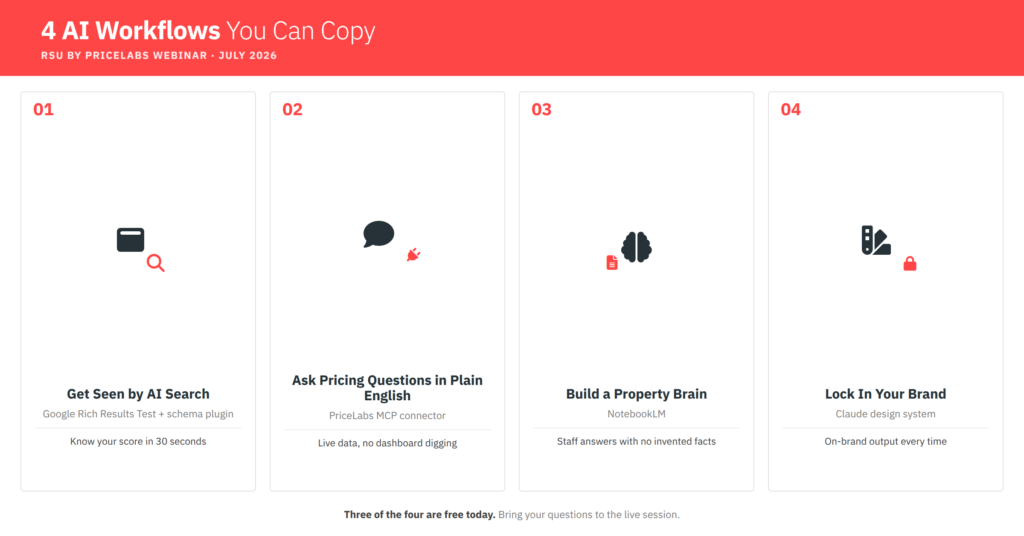
Workflow 1: How to Check If AI Search Can See Your Direct Booking Site
Travellers used to open fifty tabs. Now many ask ChatGPT for a place that sleeps four near a beach on a budget. To make that list your site must be machine-readable. Most are not.
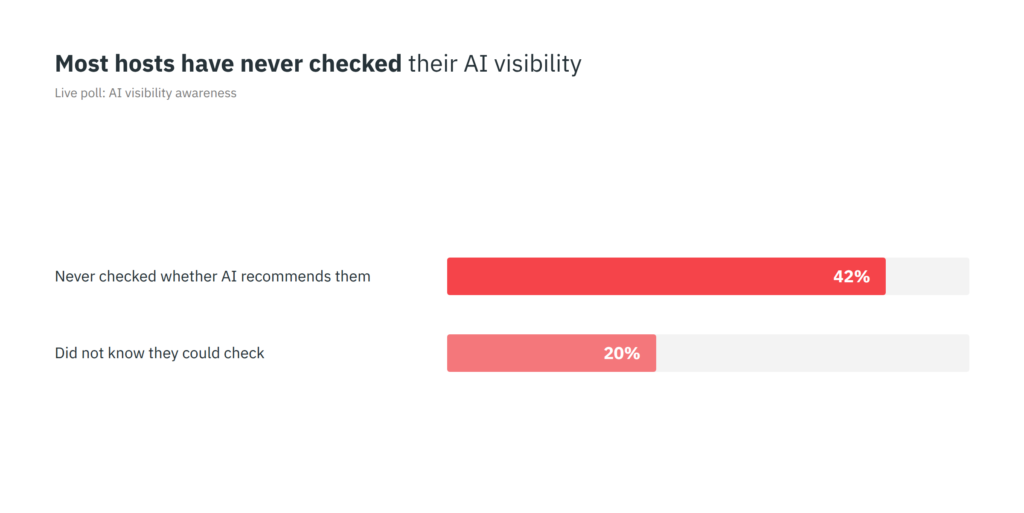
Uvika pasted a real rental website into Google’s Rich Results Test, which shows what search engines and AI can read. Result: no items detected. A Vrbo listing came back with 91 (both single examples, not a verdict on every site). Managers began testing their own and posting scores. “I got a big fat ZERO!” wrote one. A poll explained it: 42% had never checked whether AI recommends them, and 20% did not know they could.

Schema Markup Is the Label AI Reads, and a Plugin Can Add It
The gap is not how a site looks. It is labels. Listing on Airbnb or Vrbo means filling boxes: bedrooms, bathrooms, address, amenities. Each answer sits in a labelled slot, so a machine knows what it is reading. Your own site has the same facts as sentences for people, so an AI crawler guesses. Schema markup adds the labels back invisibly, and Google’s new “VacationRental” tag flags the page as a holiday rental. To check yours:
- Paste a property page URL into search.google.com/test/rich-results
- Hit Test URL and read the number
- Repeat with a Vrbo or Airbnb listing
You do not write this by hand: a plugin adds it, or your developer does. Test first so you know your score and what to ask for, then hand over RSU’s technical checklist. Being readable only gets you mentioned, though: people still read your reviews before paying.
Workflow 2: How to Ask PriceLabs Pricing Questions in Plain English
Pricing questions turn up in plain language: are we priced right for August? Answering one means logging in, setting filters, and reading charts that rarely explain themselves.
An MCP connector removes that trip: a plug that lets an AI assistant pull live data out of your software. PriceLabs gives you a code, you paste it into Claude, and they link in a minute.
Thibault demoed it on his own villa in France:
- How am I pricing against the market this summer? Well above it, correct for a high-end property, with a flag on occupancy.
- What is moving demand in my market? European Heritage Days, a photography festival, and the countries sending guests (Italy, Belgium, Spain, Switzerland).
- Can you build me an owner dashboard? Booking pace and price band, refreshing daily.
That middle answer matters most. It named why demand moved, and a local festival is exactly what a manager new to a market would miss.
One Manager’s Booking Jump Had Nothing to Do With Price
Kelly, an attendee, assumed her calendar filled because she dropped her rates. Her PriceLabs data showed prices were not lower than last year. The real change was a listing title she rewrote to highlight standout amenities. She had the cause backwards.
Two costs: these assistants charge per request, so Thibault used a cheaper model, and the connector is free in beta but mostly read-only, with price editing due in a paid tier. RSU’s full walkthrough has setup detail.
Workflow 3: How to Build a Property Brain That Never Guesses
A live poll found 53% of attendees still onboard new staff verbally, and only 14% use a digital system. Seasonal staff turn over yearly, so the same explanations get repeated, and every gap becomes an inbox question or a wrong answer given on your behalf.
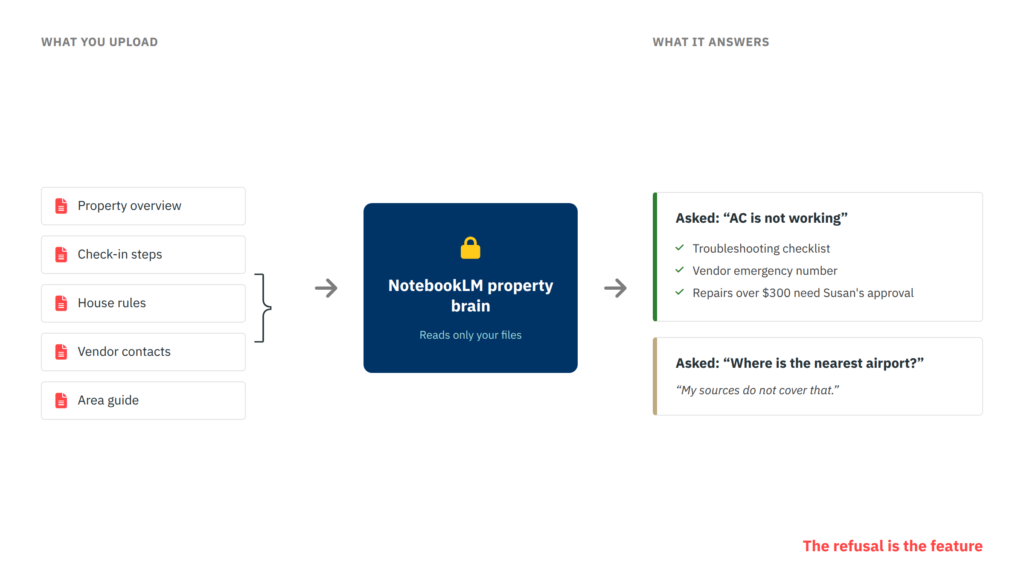
Uvika’s fix is a property brain built in NotebookLM, a free Google tool. She picks it over a normal chatbot because it reads only the files you give it, and will not search the web or invent an answer.
- Gather your property overview, check-in steps, house rules, vendor contacts, and area guide
- Create a notebook at notebooklm.google.com and upload them
- Add your team, then share one link
The Refusal Is the Feature
Asked “guests say the AC is not working,” it returned a checklist (thermostat, breaker box, batteries), the vendor’s standard and emergency numbers, and the rule that repairs above $300 need Susan’s approval, with the message to send her.
Then she asked something missing from the files: where is the nearest airport? It said its sources did not cover that. The refusal is the point: a new hire cannot be handed a confident invention.
An attendee asked whether staff could ask in Spanish when the documents are in English. They can: it answers in the language of the question, so a cleaning crew never needs a translated copy. For AI that runs tasks itself, see RSU’s five levels of AI.
Workflow 4: How to Build an On-Brand Design System
The polls split the room. 45% said AI already produces their branded material well, while 36% still make it by hand and lose hours. Anyone who has told a chatbot to “use our colours” knows it forgets by the next document.
Thibault’s answer is to teach it once. In Claude’s design feature he built a reusable design system from four things most managers already have:
- A screenshot of your website
- Your logo file
- A few property photos
- A note on how your brand speaks
It saved his colours, fonts, logo, imagery style, and templates as one named system. After that anyone can ask for an owner report, a guest guide, a website banner, or an owner-drinks invitation, and it arrives on brand. A colleague can move the logo or change the layout without breaking it. His tip: tell it to act as a senior web designer. He builds PriceLabs campaign assets this way, and named fewer approval rounds as the payoff. campaign assets this way, and named fewer approval rounds as the payoff.
Two Roads: Bring Your Software to AI, or Wait for AI Inside It
One road is your AI reaching into your tools, which suits managers who like building. The other is your software adding AI internally, which PriceLabs is also doing, and suits anyone who would rather skip the plumbing. Thibault backed trying both. Uvika’s framing was tighter: do what you already do, better, rather than rebuild around a demo.
Three of these four workflows cost nothing today. The managers who ran the visibility test live now know their number, and most of their competitors still do not.

Guneet has spent five years working at PriceLabs, developing deep expertise in short-term rental operations and hospitality technology. She brings that practitioner’s lens to her writing at RSU, covering platform updates and making sense of market data for property managers.
Related Articles:
 Airbnb’s Fourth Pillar: How AI Became a Strategic Defense Against an AI Future
 Sykes Cottages AND Casago/Vacasa on AI: Lessons for Smaller Property Managers from The Short Stay SUMMIT 2026
 Airbnb Just Made AI Judge, Jury, and Sales Agent: Inside the Summer 2026 Release
 Will AI Destroy the Revenue Manager? What I Heard at Scale UK 2026